AI-generated illustration of an imagined office, shown twice: on the left, stacks of paper, a typewriter and old monitors; on the right, the same room with laptops and people working calmly.

AI-generated illustration

Software and AI consulting, from Lithuania

Give your business room to breathe.

The dull, repeating work goes to AI, and what is missing I write: apps, websites and internal tools. The hours you get back go into the work that actually creates value. The proof is my own: products I built and still run.

  • For small teams and people working alone

    There is no corporate pipeline to learn first. We start from your own work, and the first result comes in weeks rather than quarters.

  • Fewer hours on the repeating part

    The repeating part of the build runs on current AI workflows, so the same work takes fewer hours. The price is agreed before it starts.

  • More than the code

    Years spent on other people's products and a good many of my own, so the answer fits your problem rather than one tool. You talk to the person who builds it.

Not sure where to start? The free assessment: 28 questions, about fifteen minutes, no sign-up. Start the assessment

AI consulting

Where AI saves work in your business, and how to put it in so people actually use it

For small businesses and for individuals. We start from what eats your time every day, not from a tool. No step is too small to be worth taking: the first one can be an hour showing you how to talk to AI at all, or one job lifted off your desk. The ones at the top are where most businesses begin: they go in quickly and you can see within a week whether they help. I pick the tool to fit what you already use, and no software or AI tool vendor pays me a commission.

AI-generated illustration, not a promised result

  • By hand

    The same questions about prices, opening hours and terms answered one by one, and the ones that arrive at night wait until morning.

    With my helpUsual starting point

    A chatbot that answers your customers

    A chat window on your site that answers from your price list, your terms and your FAQ, in the languages your customers write in. What it does not know, it hands to a person. One of the quickest things to put in.

    Limit It answers only from the documents it is given, so those need keeping up to date, and the handover to a person is agreed before it goes live.

    The whole example

  • By hand

    The answer hunted through folders, old quotes and past threads, or asked of the colleague who is supposed to know.

    With my helpUsual starting point

    An assistant that reads your own documents and data

    The same assistant for the team, pointed at your contracts, quotes and handbooks, and where it fits at your own database. It names the document it took the answer from. It can run on a machine you control.

    Limit It knows only what it is allowed to read. Access rights, who may see and ask what, are decided before it is connected.

    The whole example

  • By hand

    Every message opened, read and filed by hand, and the same replies typed again and again.

    With my helpUsual starting point

    Email that sorts itself

    Mail gets sorted and labelled on arrival, the important ones rise to the top, and repeat questions get a draft reply waiting. In Gmail or Outlook, whichever you already use. You decide how far it goes: some owners want only a draft to approve, others let a few clear kinds of message, opening hours or a price list question, send on their own.

    Limit By default nothing leaves without your approval. Sending on its own is switched on only for the kinds of message that can be described by a rule, and only after you have watched for a while what it would have sent. The AI writing features in Gmail and Outlook depend on your plan and may cost extra.

    The whole example

  • By hand

    Supplier, date and total copied from each invoice into a spreadsheet one at a time, and your own invoices written out in the evening, when you remember.

    With my help

    Invoices and receipts without the retyping

    Both directions. An incoming PDF or photo becomes a row in a spreadsheet or your accounting software: supplier, date, total, line items. And your own invoices get written from what is already recorded (an order, a contract, the hours), sent out, and if you want it, the unpaid ones chase themselves after an agreed number of days.

    Limit Unclear or handwritten documents keep a step where a person checks them.

    The whole example

  • By hand

    Notes written while trying to listen, and the action items left in someone's notebook.

    With my helpUsual starting point

    Calls and meetings that write themselves up

    I choose and set up a recording tool so each call leaves a transcript and a summary, and the action items land in your task list on their own. Across a month of them you can also get a read on what keeps coming up.

    Limit Everyone in the meeting has to be told it is being recorded, and most note-taking tools process the recording on their own servers.

    The whole example

  • By hand

    Enquiries spread across a form, an inbox and a phone, followed up when someone remembers.

    With my help

    Enquiries that do not get forgotten

    A new enquiry from a form or an email lands in one list, gets tagged and a drafted reply, and you get a reminder a few days later.

    Limit By default nothing is sent without your approval.

    The whole example

  • By hand

    Posts and customer emails written when there is time left over, which means usually not written, and after a quiet month it starts from nothing again.

    With my help

    Marketing that keeps going when you are busy

    Drafts a week ahead, built from your own jobs, your price list and the questions you get asked, in your voice rather than in general phrases. You look them over and approve, and the posting and sending can run themselves. The same works for a regular note to your customers.

    Limit Emailing customers needs their consent, and the platforms' own rules stay your responsibility. No invented reviews, no bought engagement, no photographs that are not yours.

  • By hand

    The numbers sit in the till, in spreadsheets and in the bank statement, and nobody puts them together, so the decisions get made on a feeling.

    With my help

    Your own numbers, read back to you

    A weekly summary that arrives on its own: what sold, what keeps repeating, where the money goes and what changed since last week, in plain sentences rather than a wall of charts. Alongside it you can have what your competitors say in public: their prices, their offers, their new pages, the thing they keep repeating in their marketing.

    Limit The reading is only as good as the data: what nobody records will not appear in it. On competitors, only what is public, and only as far as their own site terms allow.

  • By hand

    Calls interrupt the work, and the ones nobody picks up often do not ring a second time.

    With my help

    An assistant that answers the phone

    An assistant that answers out loud, says the opening hours and the prices, takes a booking or a message, and hands over to a person as soon as the call goes past what was agreed. It can run after hours only, if you answer the phone yourself during the day.

    Limit Lithuanian is the weaker side of this today: names, addresses and abbreviations come back wrong more often than in English. So we start with simple calls, test it on recordings of your own before it goes live, and the way through to a person always stays. The caller is told they are speaking to an automated assistant, and the minutes are billed.

  • By hand

    People trying AI on their own, unsure what is allowed, or not trying at all because it looks like something you need to be a programmer for.

    With my helpUsual starting point

    Teaching you and your team

    Hands-on sessions on your own work, not a slide show. I show the plain things that change the answer straight away: how to put the task, what to add as an example, how to ask for a fix, how to spot an answer that was made up. We start with what people are worried about: whether this is about their jobs, who answers for a mistake, what may and may not be pasted into AI. Then everyone tries it on a task of their own. It works for one person on their own as well as for a team.

    Limit People leave able to use the tool, not to build systems with it. For the habit to stick we agree on a few jobs the team does this way from the next morning.

    The whole example

  • By hand

    No written rule on what may go into an AI tool, so everyone decides for themselves.

    With my help

    Rules for using AI at work

    A short written document: which tools are allowed, what data may go into them, what to do when something goes wrong. And why customer data belongs only on plans that come with a data processing agreement.

    Limit This is not legal advice. Contracts and a data protection impact assessment need a lawyer.

  • By hand

    Tools picked from adverts, or from whatever a colleague happened to try.

    With my help

    Which tool to pick

    ChatGPT, Claude, Gemini or Copilot; Zapier, Make or n8n. A comparison based on whether you run on Google or Microsoft, how many of you there are and the budget, with a recommendation and the reason for it.

  • By hand

    The same background explained to a chatbot from scratch in every conversation.

    With my help

    Ready-made assistants for daily tasks

    A set of tested prompts, or a standing assistant loaded with your tone, examples and documents: for quotes, replies, descriptions. So nobody has to explain the context from scratch every time.

Each job has its own page: the problem, the possible solutions, what I set up and what it brings. See every example

Assessment

Start with the free assessment

28 questions about how the work really runs. The report stays in your browser, and you decide whether to send it to me.

Start the assessment

Why me

  • The same person assesses, builds and trains. Nothing is handed down to a junior colleague.
  • No commission from any software or AI tool vendor, so I recommend what fits, even when that is free.
  • I do not stop at advice: when the right tool does not exist, I write it.
  • I work from Lithuania, in Lithuanian and English, and to EU privacy rules rather than US ones.

Custom software

Apps, websites and internal tools built around how you work

For a business or for one person. From a one-screen tool that replaces a spreadsheet to an app that sells on the App Store. Every example below is something I have already built in my own products, or standard work with the tools I use every day.

Internal tools

For when the work runs on a spreadsheet only one person understands.

  • An admin panel to review and act on orders, requests or sign-ups, behind a login.
  • A weekly report built from your own numbers that arrives by email on its own.
  • An alert on your phone only when something changes: stock, a price, a new application.
  • A Telegram bot to check and change what is happening in a system from your phone.

Already done: an admin dashboard on Cloudflare, the two-way Telegram bridge I run my own projects through, a scheduled weekly audit report.
Landing pages and websites

For when a page has to be found and do something, not only look right.

  • A landing page for one offer, done quickly: my design, or built from examples you send, with a form or a booking on it and the results visible.
  • Written and built to be found by Google and quotable by ChatGPT or Gemini: structured data, speed, the phone view, llms.txt.
  • A site in as many languages as your customers need, with a calculator or questionnaire that gives the visitor an answer on the spot.
  • A booking page with a calendar and reminders.
  • A content site with dozens of pages, built so Google can index it and AI search engines can cite it.
  • A paid online service: card payment, refunds, receipts.

Already done: glasyn.app, the page for my own iPhone app, with its FAQ, glossary and explainer pages, kept clean against Google Search Console; this site, in two languages, with structured data and an llms.txt for AI search; rateven.com with forecasts for nine football leagues; a pay-per-use fax service on Stripe.

Phone apps

For when your customers or your staff do everything on a phone.

  • An iPhone app with a subscription, reminders and offline use.
  • An app for both iPhone and Android, with in-app purchases in both stores.
  • An app without accounts that collects as little data as possible, so it is easier to explain and to protect.
  • The whole route onto the App Store: screenshots, descriptions, submission, replies to App Review.

Already done: several of my apps sell on the App Store, and GeoWrecked was built for both iPhone and Android.

Connections and automations

For when the same data is typed from one system into another.

  • A website form that creates the record, sends the confirmation and tells you, in one go.
  • A nightly payment check: what was paid, what was refunded, what is stuck.
  • Company email addresses forwarded to the inbox you already use, without running a mail server.
  • Newsletters and system emails through a proper sender, set up so they are less likely to land in spam.

Already done: payment reconciliation on Stripe, with Polar refunds, email routing on this site, email through Brevo with a weekly test send.

AI features in your product

For when AI has to work on your data and by your rules, not in general.

  • A chat assistant inside an app, with a free allowance and a paid plan.
  • An assistant that answers from your own documents and shows where each answer came from.
  • A questionnaire that turns answers into a report with the working shown, rather than a chatbot.
  • AI that runs on the iPhone itself, so data stays on the phone and there is no monthly model bill.

Already done: an AI coach with a usage cap in a coffee app, this site's assessment engine, on-device story generation on iPhone (built, in TestFlight).

Tools for AI agents

For when you want Claude, Cursor or another assistant to work directly with your system.

  • An MCP server that lets an AI assistant read and change data in your system, with clear permissions.
  • License keys and subscription checks for a tool you sell to developers.

Already done: asc-mcp, a public open-source MCP server for App Store Connect with 41 tools and a paid plan.

How every build is checked

  • Accessibility to WCAG 2.2 AA: contrast, keyboard, screen readers, 200% text zoom.
  • Every button and every step is driven in a browser or a phone simulator before handover.
  • A security scan whenever something touching data or payments changes.
  • A privacy notice and legal text written for what the software actually does.

What I do not take on

  • Software that needs certification for medicine, financial advice or legal opinions.
  • Round-the-clock on-call support. I work alone, so we agree what gets fixed and how fast.
  • Large enterprise systems such as SAP without access to their API.
  • Hardware and embedded devices.

Work

Products I built and still run

My own apps, live on the App Store, on the web and on npm. Each one has a page on who it is for, what makes it hard to copy and why it was built that way.

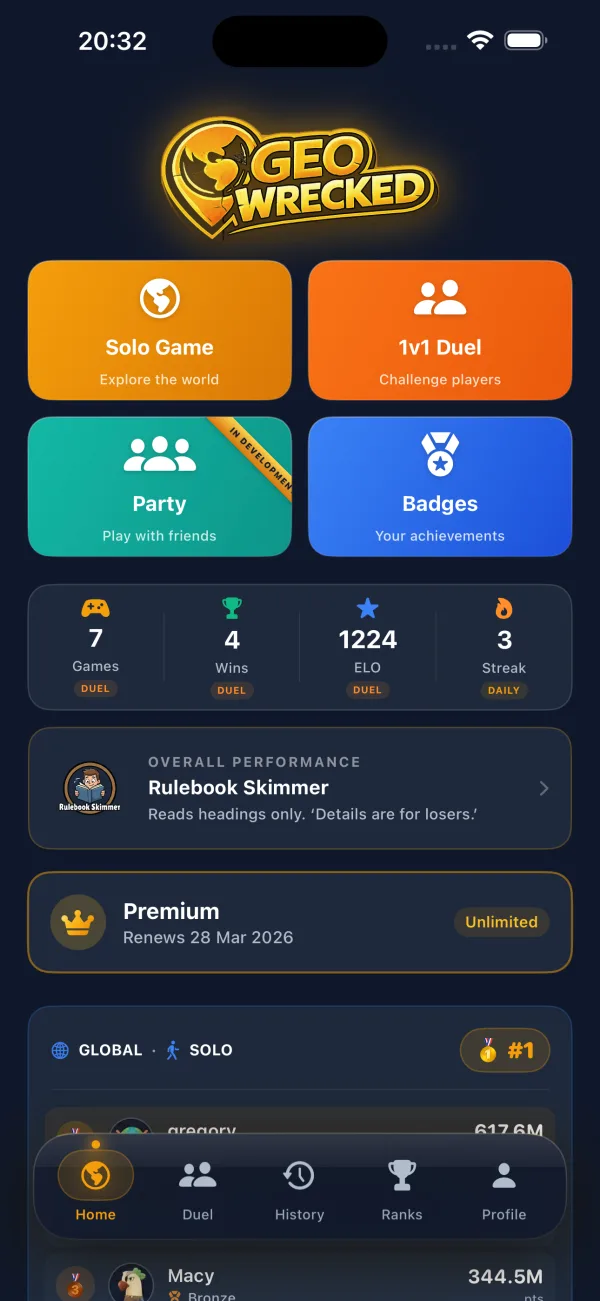
GeoWrecked home screen: solo game, duel, party and badges
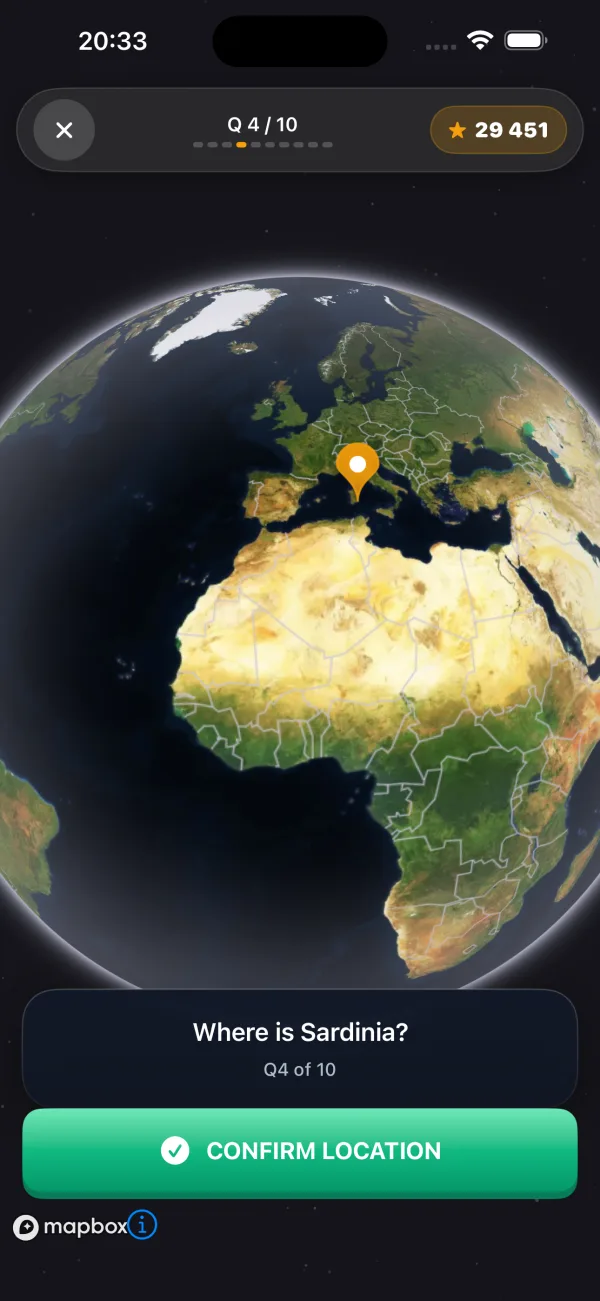
The question Where is Sardinia? on the 3D globe, with a pin placed
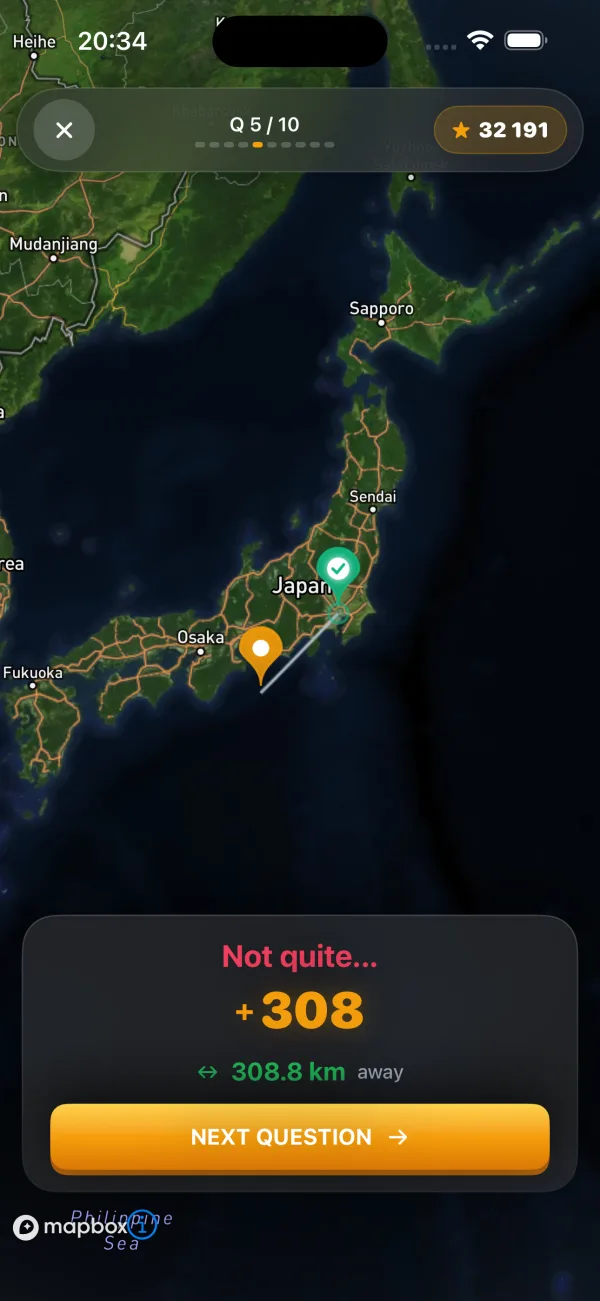
Zoomed map of Japan with a guess near Tokyo

GeoWrecked

Geography game on a 3D globe

Drop a pin on the globe. Points go by distance, not by right or wrong.

Web: liveiPhone: liveAndroid: built, not published

Hard to copy

Every kilometre counts

A normal quiz punishes a near miss. Here the score grows as you get closer, so a player who knows the region but not the exact city still scores, and keeps playing.

How it was built
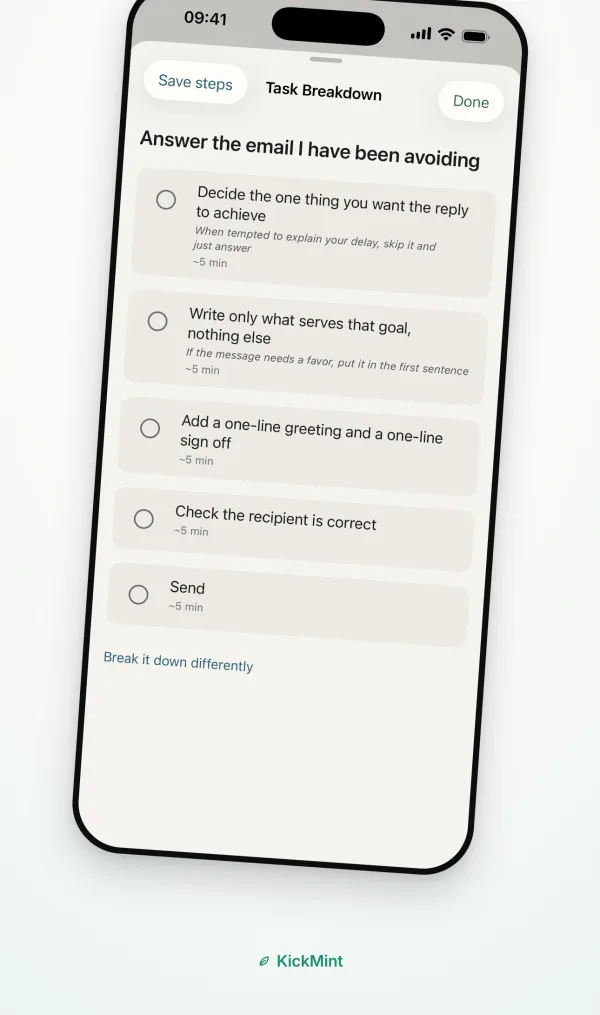
KickMint splits an avoided email into five steps
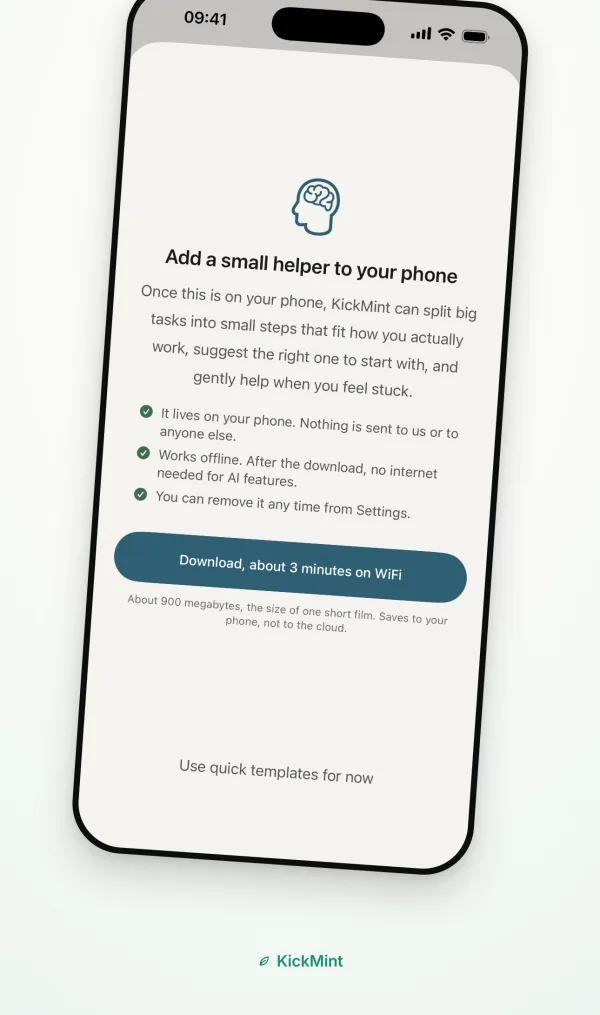
Offer to download the AI model that runs on the phone

KickMint

Task starter for adults with ADHD

Breaks a task into a few small steps with AI that runs on the phone itself.

iPhone: live

Hard to copy

AI on the phone, not in the cloud

The language model downloads to the phone once and then works offline. There is no account, no server for tasks to travel to, and no monthly model bill.

How it was built
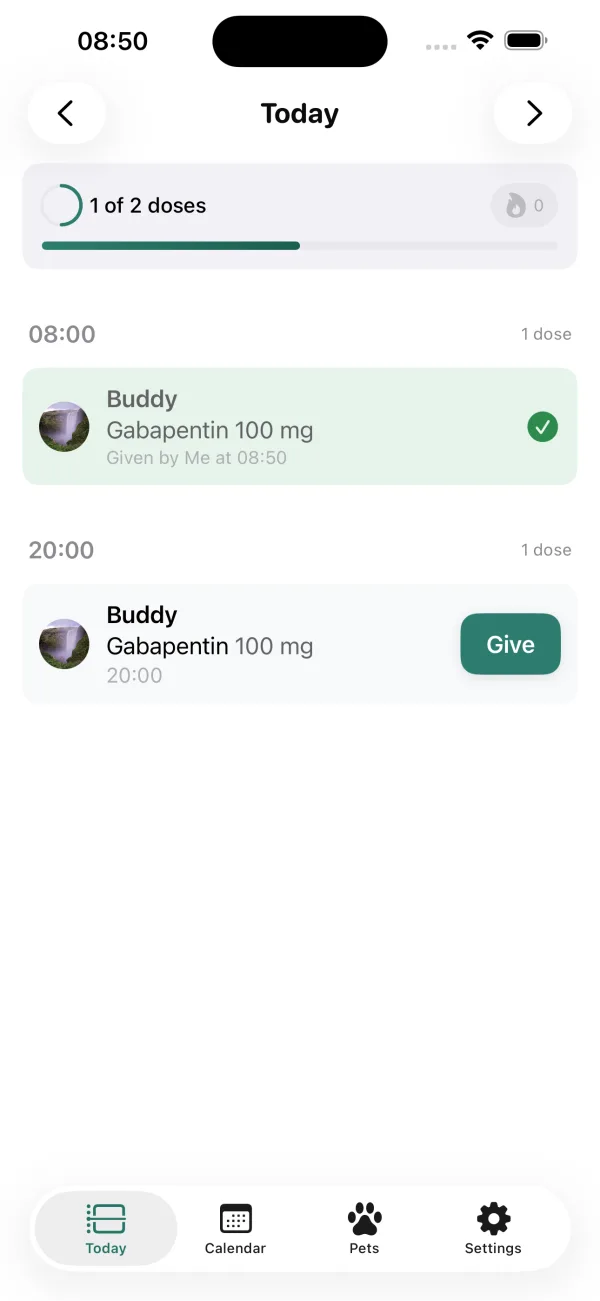
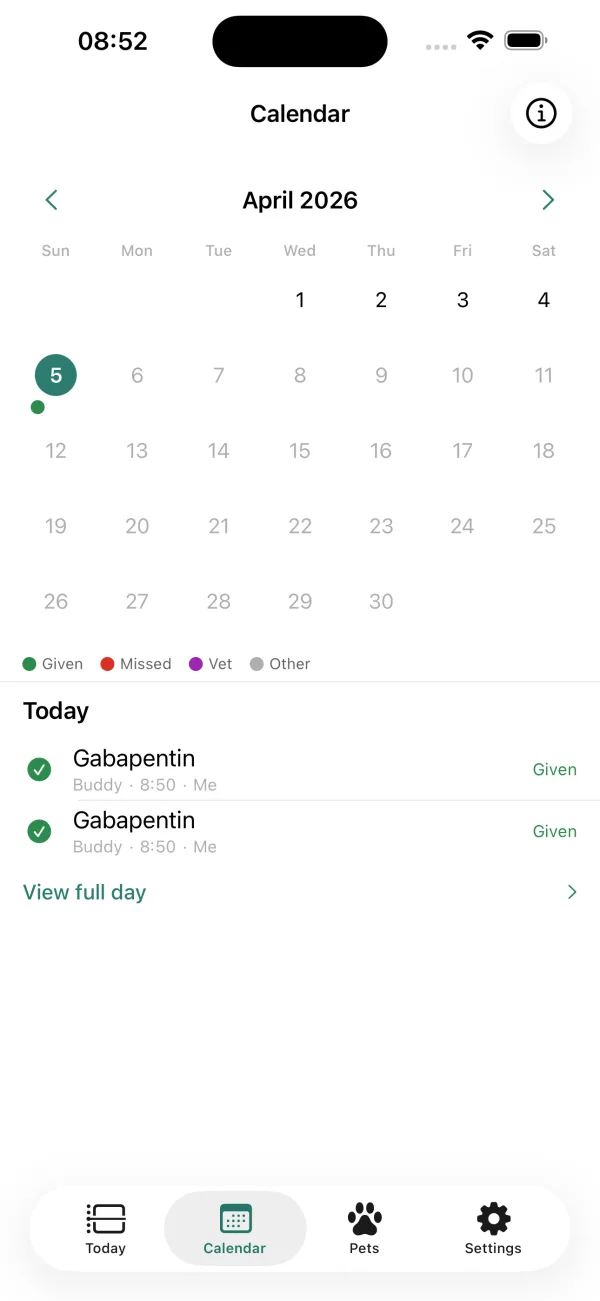
Today's medication schedule with one dose given and one due
Month calendar marking the doses given

Remewdy

Pet medication tracker

Dose schedules, reminders and a record for the vet that family and sitters can fill in too.

iPhone: live

Hard to copy

The sitter needs no app

A neighbour or sitter marks a dose in a browser from a link. They are not the paying user, so they should not have to install anything.

How it was built
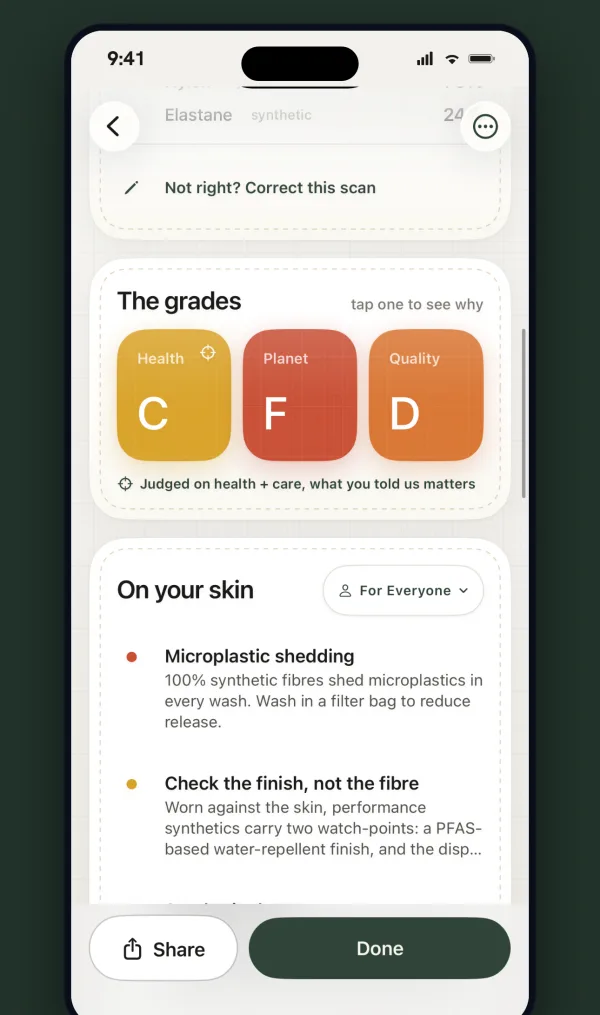
Scan result: composition and grades for health, planet and quality
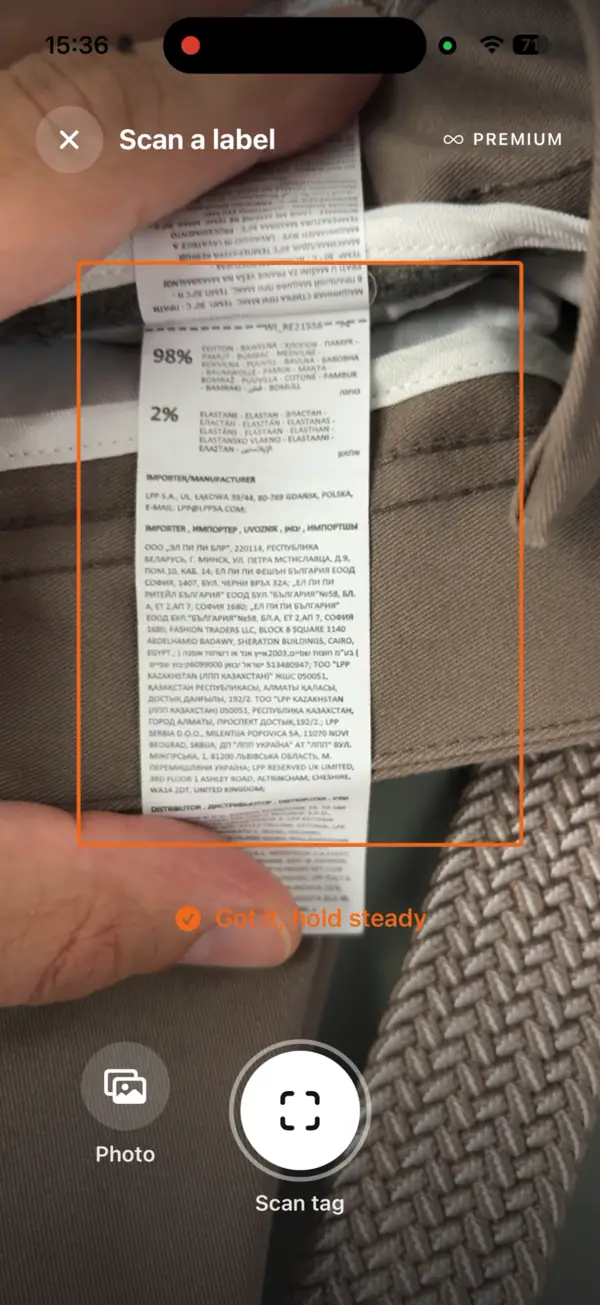
Scanning a label: the frame over a real care label, with the app confirming it has it

ClothTrace

Care-label scanner

Reads a garment's care label and tells you what it is made of and what that means for skin, planet and quality.

iPhone: live

Hard to copy

Reads the label instead of guessing from a photo

The result rests on what is printed. The app shows how sure it is and never invents a percentage it did not see.

How it was built
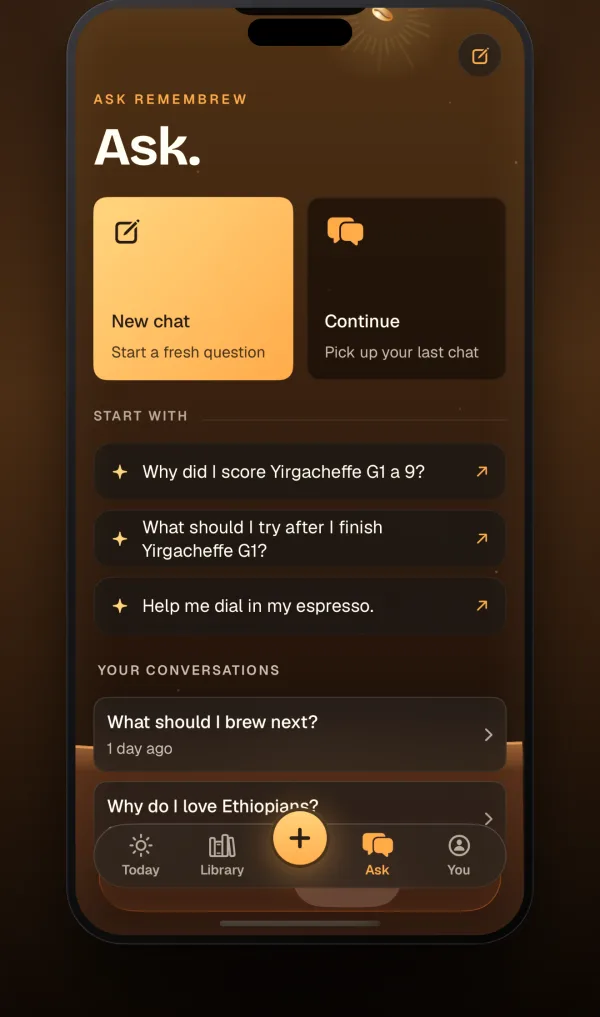
The Ask screen with questions about your own coffee taste
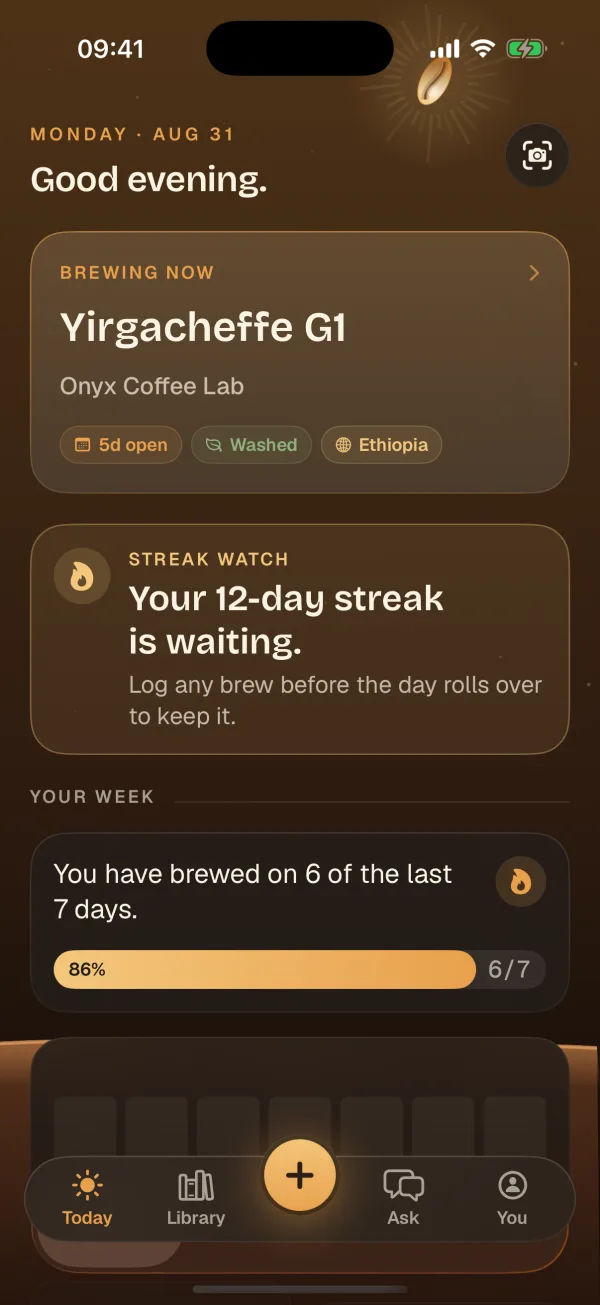
Today's screen: the coffee brewing now, the streak and the week so far

Remembrew

Coffee log, cafés and roasters

Scan a bag, note the taste, and ask which coffee you actually like.

iPhone: live

Hard to copy

A directory compiled city by city

3,134 speciality cafés and 1,391 roasters across 129 cities in 59 countries at remembrew.com, compiled and placed on the map.

How it was built
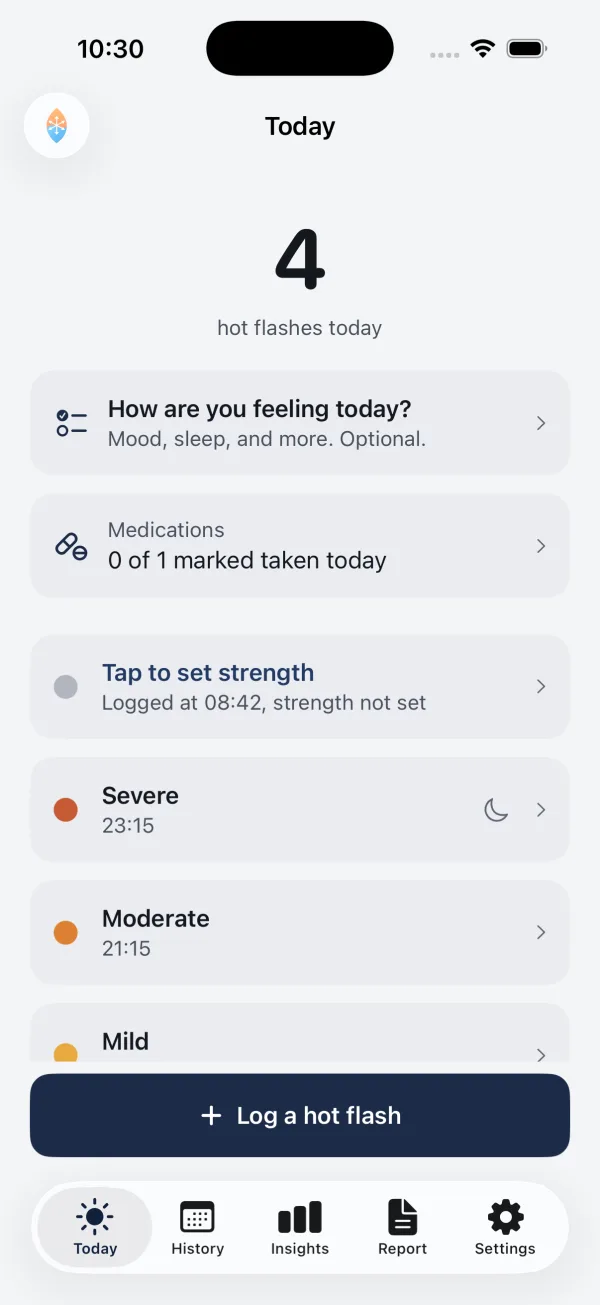
The Today screen: how many hot flashes today, the daily check-in, and the button to log one
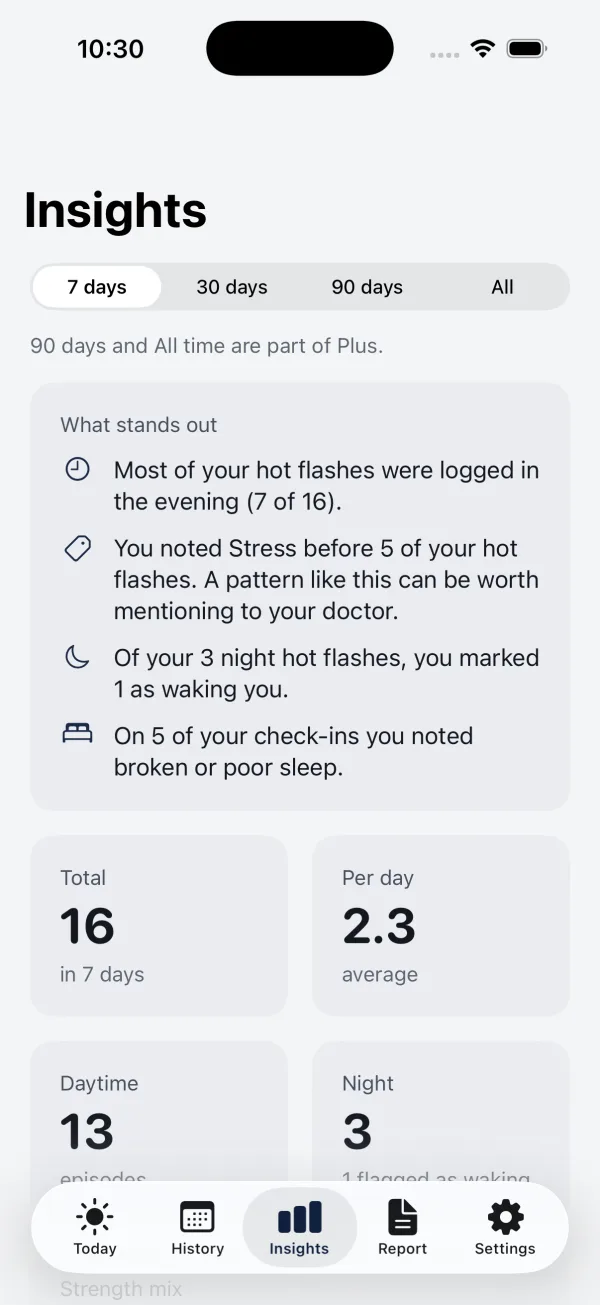
Insights: when the flashes happen, how many at night, how many woke the person

Glasyn

Hot flash diary

Log a hot flash in two taps, see your own pattern, and take a one-page summary to the doctor.

iPhone: live

Hard to copy

Two taps, at the worst moment

The entry is made while the person is hot and uncomfortable. So the main screen is one button and a strength, and everything else, notes and triggers, stays optional.

How it was built
Example requests from the project README
  1. Run a preflight check on my app

    release_preflight

    Metadata, character limits, screenshots and build status audited.

  2. Give me a morning briefing

    daily_briefing

    Who is in review, who was rejected, new low ratings, and what to do.

  3. Generate release notes from my git history

    release_notes

    Commits since the last tag, grouped for the What's New text.

asc-mcp

An App Store Connect tool for AI coding agents

An open-source MCP server: ship an app to the App Store without leaving Claude Code or Cursor.

npm: live

Hard to copy

Curated tools, not a raw API list

41 tools, each built around a release task, that already know App Store Connect's rules, such as character limits and what a submission needs.

How it was built

Working together

Get your business leverage with AI

You know the price before work starts: the analysis has one flat fee, and everything else is agreed up front. The free assessment stays complete: nothing in it is blurred out and there is nothing to unlock.

  1. EUR 500, within two business days of the call

    The analysis

    The assessment, done with me and on your real data: your two most expensive processes written out step by step with their exceptions, and the analysis in writing within two business days of the call, in the order I would do it and with what each part costs. The two days start once I have what I asked you for on the call. If waiting is the right answer after this, I say so.

  2. depends on the scope, agreed up front

    The build

    An app, a website, an internal tool or an automation, for when you want the work done rather than described. The price depends on the scope and is agreed up front, and the acceptance criteria are written down before work starts, so the finished work is checked against what was agreed. Where you already run something, it builds on that rather than moving you onto something new.

  3. a monthly fee, agreed up front

    Alongside

    Two sessions a month in which your own people build the next thing while I sit alongside. It is aimed at one thing: that somebody inside the firm can keep it working once I am gone.

No commitment attached. If waiting is the right answer in your case, I will say that too. If someone else makes the decision, bring them to the call. The booking page is Google's; what it collects is in the privacy notice.

About

One person, start to finish

I am Povilas Konopackas, a sole trader in Lithuania. I design, build, test and publish software myself, and my products are live on the App Store, on the web and on npm.

I build with AI coding tools and a checking system I wrote for them: before anything ships, every flow is driven in a real browser or phone simulator and checked for accessibility and security problems. That is how one person can take on a whole product without skipping the checks.

The consulting comes from the same work. I use these tools every day, so I can tell you what they do well, where they go wrong and what they cost to keep running.

Full profile and experience

Common questions

What people usually ask

How much does an app or a website cost?

It depends on the scope, so there is no price list. The price is agreed between us before work starts, together with a written scope and acceptance criteria. Changes to the agreed scope are agreed in writing before they are done.

Do you write the code with AI?

Yes, and I say so. I build with AI coding tools, and everything they produce goes through the same checks before it reaches you: every flow driven in a browser or simulator, accessibility checked against WCAG 2.2 AA, and a security scan whenever data or payments change.

Can you publish an app to the App Store for us?

Yes. I publish my own apps there: screenshots, store text, submission and replies to App Review. Your app is published under your own Apple developer account: you need your own Apple Developer Program membership, and I work in it with the access you grant.

Do we have to use a particular AI tool?

No. I recommend based on what you already use, Google or Microsoft, the size of the team and the budget, and no software or AI tool vendor pays me a commission or referral fee for a recommendation. Sometimes the right answer is a feature you already pay for.

Would our data leave the firm if we worked together?

It depends on the design, and that is decided before work starts rather than after. Some work runs entirely inside your own infrastructure. Where an external model is used it is named in the contract as a sub-processor, and the data processing agreement is signed before work starts.

Is the assessment still free?

Yes. It has its own page, takes about fifteen minutes, and your answers stay in your browser unless you choose to send them.